
Expenses Were Scattered Across Tools
Site expenses were shared through WhatsApp, notebooks, spreadsheets, and phone calls, making it difficult to know which payment was pending, verified, approved, rejected, or transferred.
 Featured Case Study
A mobile-first construction payment approval and expense management software built to digitize site ledgers, daily expenses, project balances, accountant transfers, and admin reporting.

Confidential Client

Custom Development Engagement

2025
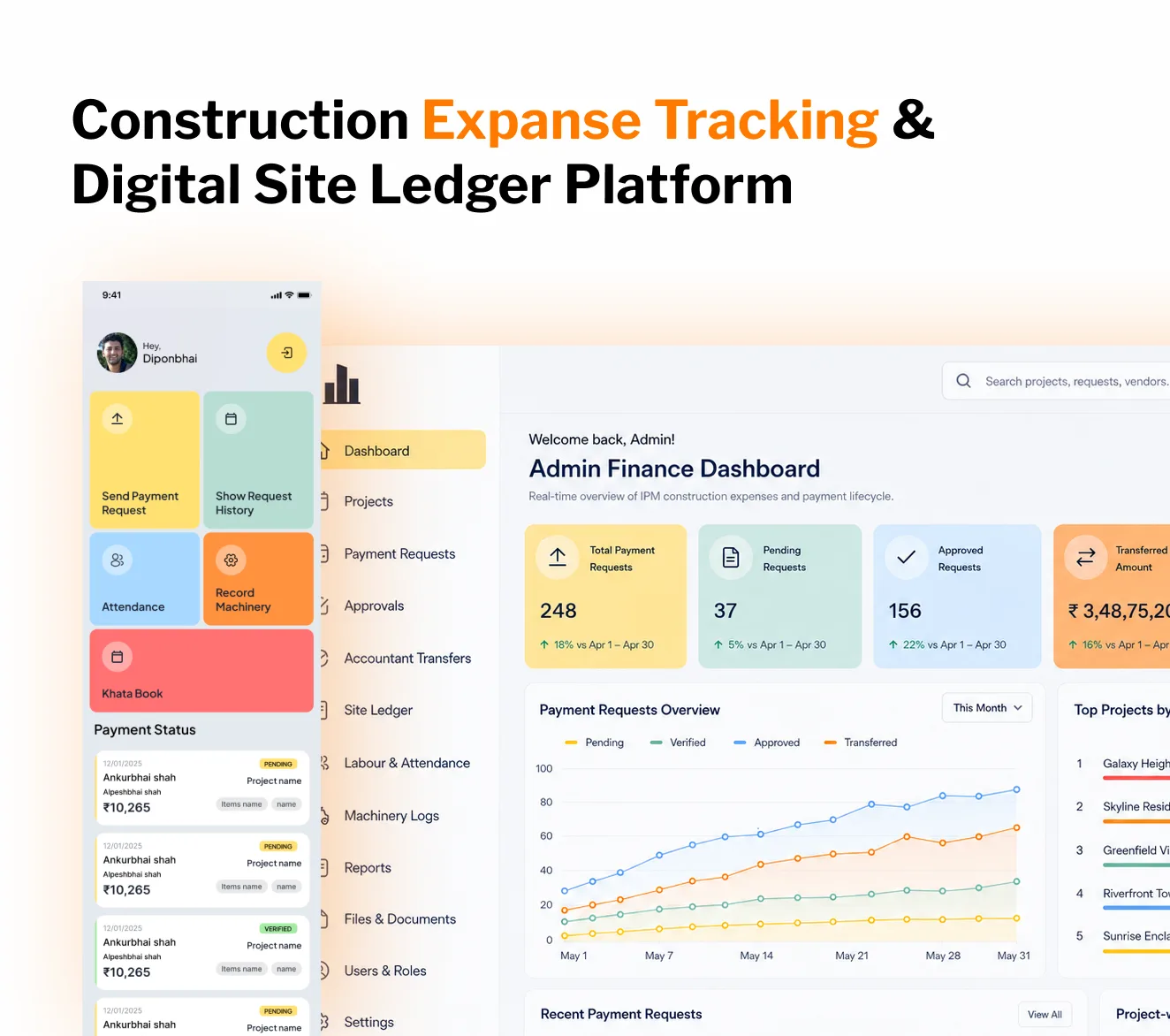
The client needed a reliable construction expense tracking system to manage daily site expenses across multiple active projects. Their existing process depended heavily on notebooks, Excel sheets, WhatsApp messages, phone calls, and manual confirmations between site engineers, project managers, admins, and accountants. This created gaps in visibility, delayed approvals, duplicate records, unclear payment responsibility, and limited control for admins managing multiple projects.
We built a Construction Expense Tracking & Digital Site Ledger Platform using a Flutter mobile app, FastAPI backend, PostgreSQL database, and centralized admin dashboard. The platform digitized expense creation, payment approvals, ledger tracking, project balances, labour-related payments, machinery expenses, file uploads, notifications, and admin-level reporting into one structured system.
The Flutter mobile app allowed site users to create payment requests, add debit and credit ledger entries, upload bills, mark attendance-linked labour expenses, track machinery-related site costs, and receive payment status notifications directly from the field. The admin dashboard gave office teams a complete view of pending payments, approved payments, transferred amounts, project-wise spending, ledger balances, suspicious entries, and exportable reports.

Build a construction-focused expense management platform that allows site teams to raise expenses from the field, admins to approve payments with full context, accountants to track transfers, and management to monitor project-wise spending through a digital site ledger and reporting dashboard.

Construction companies, project owners, site engineers, project managers, admins, accountants, labour supervisors, subcontractor coordinators, and finance teams managing daily site expenses across multiple construction projects.

Reduce manual expense follow-ups, improve payment approval speed, prevent duplicate ledger entries, give admins project-wise financial visibility, improve accountability between site and office teams, and create a clean audit trail for every payment request and ledger entry.
The project required building a practical construction expense tracking system that could support real site-level payment workflows, daily ledger records, approval flows, and admin finance reporting.
The most important requirement was payment flow management. Site engineers needed to create payment requests from the mobile app with project details, person or subcontractor details, amount, category, priority, GST information, remarks, and supporting files or bills. Project managers needed to verify these requests, admins needed to approve them, and accountants needed to mark payments as transferred.
Every payment request needed a clear lifecycle: site engineer creation, project manager verification, admin approval, accountant transfer, requester notification, and permanent reporting visibility. This ensured that each payment could be tracked from field submission to final transfer without manual calls or WhatsApp follow-ups.
The second major requirement was digital site ledger tracking. Construction sites often use daily debit and credit entries to track cash movement, labour payments, material costs, subcontractor payments, site advances, and other project-level transactions. The client needed this manual ledger process converted into a digital system with running balances, file attachments, person-wise tracking, project-wise tracking, item tagging, suspicious entry marking, and export support.
The system also needed strong duplicate prevention. If a payment request was already connected to a ledger entry, the platform needed to prevent duplicate ledger records from being created accidentally. This was handled through both backend logic and database-level safeguards.
From the admin side, the dashboard needed to show pending payments, verified payments, approved payments, transferred payments, rejected requests, project-wise expense totals, ledger balances, person-wise records, uploaded bills, attendance-linked labour costs, machinery expenses, and exportable reports. The Flutter mobile app needed to be fast and simple for field users to submit expenses, upload bill images, record ledger entries, receive notifications, and check payment status without depending on office staff for every update.
A dedicated team of experts assembled to ensure project success

Experience: 7+ years building scalable API systems, payment workflows, ledger modules, role-based permissions, and PostgreSQL-backed financial platforms.

Experience: 5+ years building mobile-first business applications with Flutter, including expense forms, file uploads, notifications, location permission handling, and field-user workflows.

Experience: 6+ years building operational dashboards, approval panels, reporting tables, export modules, and admin-side financial visibility tools.

Experience: 6+ years designing relational database schemas, ledger structures, running balance calculations, duplicate prevention logic, and audit-friendly transaction flows.

Experience: 4+ years testing payment journeys, ledger entries, approval flows, role-based access, mobile submissions, file uploads, and reporting accuracy.

Experience: 8+ years converting manual construction operations into structured digital workflows for expense tracking, approvals, reporting, and site-level accountability.
Scattered expense records, manual ledger tracking, duplicate entries, delayed approvals, weak project-wise visibility, and disconnected field-to-office communication.

Site expenses were shared through WhatsApp, notebooks, spreadsheets, and phone calls, making it difficult to know which payment was pending, verified, approved, rejected, or transferred.

We built a centralized workflow where site engineers raise expenses from the Flutter app and every request moves through verification, approval, and accountant transfer stages.
Daily site transactions were recorded manually, making it difficult to maintain running balances, connect expenses with projects, attach bill proofs, and verify person-wise records.
We built a digital site ledger with debit and credit entries, project-wise records, person-wise records, item tagging, bill attachments, running balances, suspicious entry marking, and export support.
In manual systems, the same payment could be entered more than once or connected incorrectly with ledger records, creating confusion in balances and increasing accounting risk.
We added application and database-level validation to prevent duplicate ledger entries from being created from the same payment record, reducing duplicate ledger risk by approximately 92%.
Office teams had to manually call site engineers, project managers, and accountants to understand payment status, slowing down approvals and creating avoidable back-and-forth.
We built dashboard views for pending requests, verified requests, approved payments, accountant transfers, rejected requests, uploaded files, project-wise totals, and payment status history.
Management could not easily see how much money was being spent on each project, which categories were consuming budget, or which payments were still pending approval.
We added project-level financial tracking with balances, purchase order details, bank information, project-user mapping, item mapping, payment analytics, and expense summaries.
Labour wages, subcontractor costs, and machinery usage were difficult to connect with daily site activity, making project cost tracking incomplete.
We added attendance and wage management, subcontractor tracking, machinery punch-in/punch-out, project-wise usage logs, file attachments, and exportable history for admin review.
Construction expense tracking, digital site ledger, payment approval, admin reporting, and mobile field operations features designed for real site finance workflows:
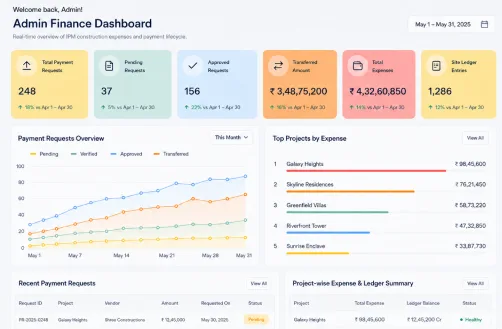
A centralized dashboard gives office teams a complete overview of construction expenses, payment requests, approval flows, accountant transfers, ledger entries, project balances, and operational records from one interface.
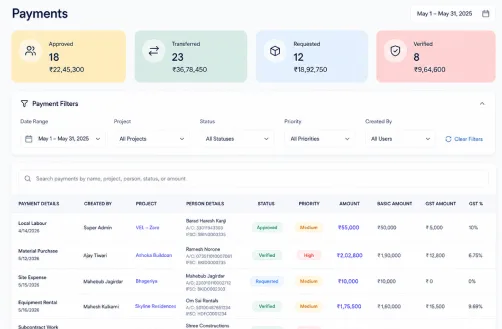
A dedicated payments dashboard helps admins and finance users manage approved payments, requested payments, verified payments, transferred amounts, GST values, priority, and payment status.
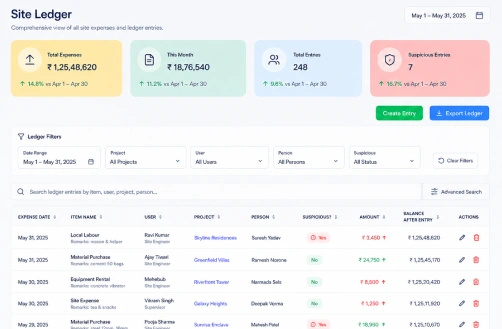
A digital site ledger replaces manual bahi khata-style tracking with searchable debit and credit entries, project-wise records, person-wise transactions, suspicious entry tracking, and exportable reports.
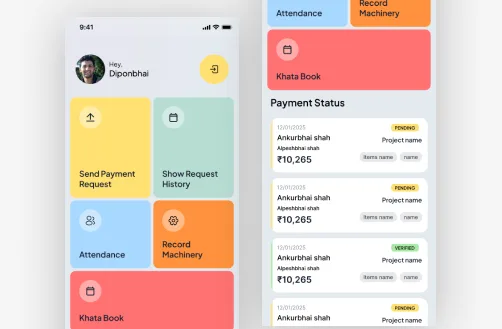
The Flutter app home screen gives site users quick access to payment requests, request history, attendance, machinery recording, pending approvals, and the digital site ledger.
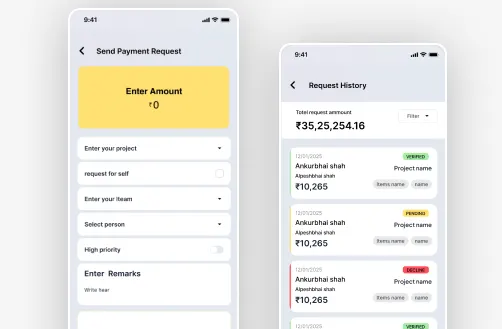
Site engineers can select a project, enter amount and category details, attach bills, add GST and payment information, and submit requests directly from the construction site.
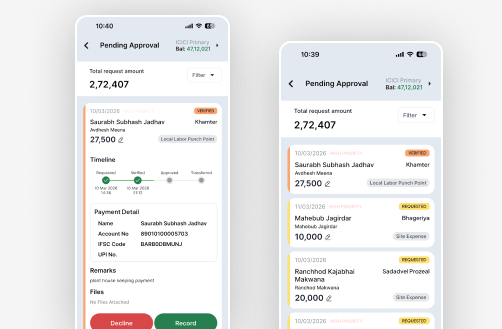
Field users can track whether submitted payment requests are pending, verified, approved, rejected, or transferred without repeatedly calling admins or accountants.
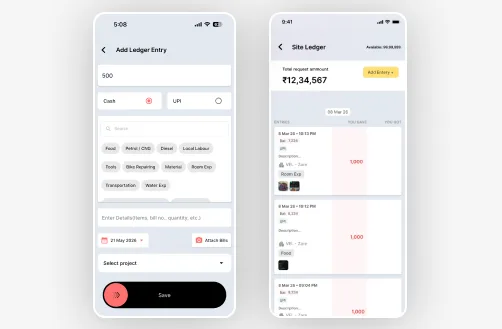
Field users can create and review daily debit and credit entries for labour payments, material purchases, subcontractor payments, site advances, fuel expenses, and transport charges.
Measurable impact driven by construction expense tracking, digital site ledger automation, and payment workflow visibility
Requests moved from calls and WhatsApp into a structured approval workflow
Daily debit and credit records digitized into a searchable ledger system
Project-wise expense visibility improved through structured records and reports
Clear create, verify, approve, transfer, and notify actions reduced delays
Application and database-level checks prevented duplicate payment-to-ledger entries
Notifications and dashboard visibility reduced dependency on repeated calls
Admins could export payment, ledger, project, labour, and machinery reports directly
Every request had a clear trail from creation to transfer notification
 Let's Build Something Amazing
Looking to digitize construction expenses, site ledgers, payment approvals, project balances, and admin reporting? Our team builds scalable mobile-first construction payment approval and expense management software that brings site finance and office operations into one reliable system.
