Devops
Zero-Downtime Migration: A Practical Playbook for Production Systems
There are two kinds of migrations in my career: the ones I’m proud of, and the ones that woke me up at 3 a.m. The difference between them usually comes down to a single decision made weeks before the cutover whether we committed to a zero-downtime migration or convinced ourselves we could get away with a “short maintenance window”.
We’ve never gotten away with it. Every time we’ve scheduled a maintenance window, something has gone sideways and it’s turned into six hours of frantic firefighting while the business burns money. The zero-downtime approach takes more engineering up front, but it buys you something no migration plan can: the ability to stop, roll back, and try again tomorrow if things don’t work.
This guide is for the engineer or architect tasked with moving a production system database, platform, or both without the business feeling it. I’ll walk through the strategies that actually work in production, the database techniques you need to know, a step-by-step playbook I’ve run on four migrations including an ecommerce replatforming that moved 500,000 customers without losing a single one, and the mistakes that turn “zero downtime” into “four hours of downtime”.
TL;DR
Zero-downtime migration means moving a production system (app, database, or both) to a new platform without users ever noticing. The four strategies that work in production are blue-green deployment, canary release, rolling deployment, and parallel run. For databases, the expand-contract pattern and change data capture (CDC) are the tools you’ll use most. The key discipline is never cutting over in one step always route traffic gradually, keep rollback available at every stage, and assume something will go wrong at 2 a.m.
What is zero-downtime migration?
Zero-downtime migration is the practice of moving a live production system an application, a database, or an entire platform to a new version or new infrastructure without any period during which users experience service interruption. The existing system keeps serving traffic while the new one is prepared, data is synchronized between the two, and traffic shifts over gradually until the old system can be decommissioned.
The opposite is a big-bang migration: stop the old system, do the work, start the new one. Big-bang is simpler but risky if anything fails, your service is down until you fix it or roll back. For most modern businesses, even thirty minutes of unplanned downtime is unacceptable, which is why zero-downtime migration has moved from “nice to have” to default expectation.
In practice, “zero downtime” usually means downtime measured in seconds at the DNS or load-balancer cutover. True zero-zero is achievable with enough engineering, but for most real systems “undetectable to users” is the honest benchmark.
Why zero-downtime migration matters: the real cost of downtime
If you want to justify the extra engineering effort to a finance team, start with the numbers. Gartner’s most recent data puts the average cost of IT downtime at roughly $5,600 per minute for mid-sized businesses, with 90% of enterprises reporting a single hour of downtime costs more than $300,000. For ecommerce brands during peak sales, the cost multiplier gets worse we’ve measured ₹40 to ₹60 lakh per hour of downtime during Diwali sales for mid-market Indian fashion retailers.
But the numbers understate the problem. The real cost of a visible outage during migration is trust. Customers who can’t complete a checkout go to a competitor. SEO rankings drop when Googlebot hits a maintenance page. The product team loses weeks of roadmap capacity to post-incident cleanup. The engineering team loses morale.
Zero-downtime migration protects all of that. It costs more up front typically 20 to 40 percent more engineering hours than a big-bang approach but the ROI shows up the moment the first thing goes wrong and you simply pause instead of scrambling.
The four zero-downtime migration strategies that actually work
There are four patterns you’ll use, alone or in combination, to achieve a zero-downtime migration. Each has a specific situation where it’s the right choice.
1. Blue-green deployment
You maintain two identical production environments. Blue is live and serving traffic. Green is the new version, fully deployed but idle. You test green thoroughly, then flip the load balancer to send all traffic to green in a single atomic switch. If something goes wrong, you flip back to blue instantly.
Use blue-green when: you have a clean cutover with no long-running state changes, your infrastructure budget can tolerate running two environments simultaneously (briefly), and you want the fastest possible rollback in case things fail.
Don’t use blue-green when: you have a shared database with major schema changes, or your sessions aren’t portable between environments. The data layer is where blue-green typically breaks.
2. Canary release
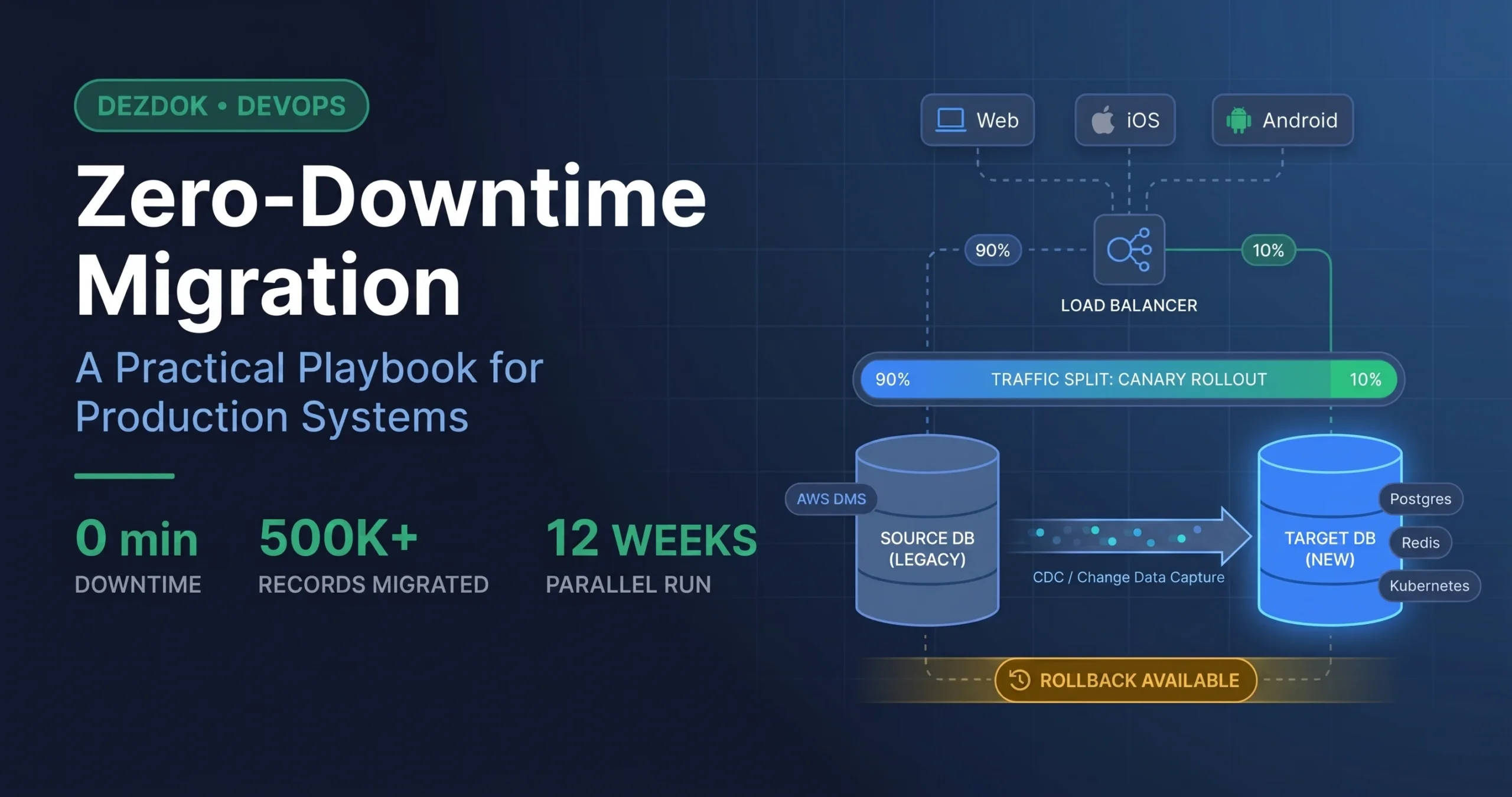
Instead of flipping all traffic at once, you route a small percentage often 1%, then 5%, then 25% to the new version and monitor closely. If error rates or latency spike on the canary, you roll back before it reaches everyone. If metrics stay healthy, you gradually increase the percentage until the new version is serving 100% of traffic.
Use canary when: you’re shipping a change that could affect user experience subtly (a search algorithm tweak, a new recommendation engine, a checkout UX change) and want real production data before full rollout. It’s also a strong choice for large-scale ecommerce platforms where even a 2% regression in conversion is a meaningful business event.
Pair canary releases with feature flags so you can toggle behavior per user segment without redeploying. This is how Netflix, Shopify, and most high-traffic platforms ship dozens of changes a day without breaking anything.
3. Rolling deployment
The new version replaces old instances one at a time within the same environment. Your cluster has ten pods; rolling deployment takes one pod down, deploys the new version, brings it back up, then moves to the next one. Kubernetes handles this natively it’s what happens every time you run a Helm upgrade.
Use rolling when: the change is low-risk, backward-compatible at the API level, and doesn’t require coordinating multiple services. It’s the boring default for routine deployments and it works well.
Rolling deployment is weaker for migrations that touch the database schema, because during the rollout you’ll have some instances running the old version and some running the new one both need to work against whatever state the database is in at that moment.
4. Parallel run (the strangler fig pattern)
The old and new systems run side by side for weeks or months. Traffic shifts gradually from one to the other by customer cohort, by geography, by feature until the old system is doing nothing and can be switched off. Named after the fig tree that grows around a host tree and eventually replaces it.
This is the strategy for the largest, highest-risk migrations: full platform replatforming, moving from a monolith to microservices, or switching cloud providers. It’s slow and operationally expensive, but it’s the only approach that lets you keep both systems fully available throughout a months-long migration.
On a recent Dezdok project a fashion ecommerce platform with 500,000 monthly visitors moving off a decade-old PHP monolith we ran the parallel pattern for 12 weeks. By the time we switched the last customer cohort, the migration felt like a non-event. That’s what you want.
When to use which strategy at a glance
| Strategy | Best for | Rollback time |
|---|---|---|
| Blue-green | App versions, clean cutovers | Seconds |
| Canary | UX changes, A/B-able features | Minutes |
| Rolling | Routine deploys, low-risk updates | Minutes to hours |
| Parallel run | Platform migrations, DB moves | Days (gradual) |
Most real migrations combine strategies. Our fashion ecommerce project used parallel run at the platform level, blue-green for the final cutover of individual services, and canary releases for risky UI changes in the new platform’s first weeks. Don’t pick one pick the right one for each decision.
Zero-downtime database migration techniques
The hardest part of any zero-downtime migration is usually the database. Applications are stateless; you can kill and recreate them freely. Databases are stateful, they hold your business, and a bad schema change can lock a production table for hours. Here are the techniques that make zero-downtime database migration achievable.
The expand-contract pattern
This is the single most important pattern for zero-downtime schema changes. You never change a column in place. Instead, you expand (add a new column alongside the old one), migrate gradually (write to both, backfill old data, shift reads), then contract (remove the old column once nothing uses it).
A concrete example: renaming a column from customer_phone to phone_number.
| Expand-contract pattern — renaming a column safely — Phase 1: EXPAND (day 1) — Add the new column, nullable, no lock ALTER TABLE customers ADD COLUMN phone_number TEXT; — Deploy application v2: writes to BOTH columns — (both old and new app versions coexist) — Phase 2: BACKFILL (day 2, off-peak) — Copy data from old to new in batches UPDATE customers SET phone_number = customer_phone WHERE phone_number IS NULL AND id BETWEEN 1 AND 10000; — Repeat in 10k-row batches until done — Phase 3: MIGRATE READS (day 3) — Deploy application v3: reads from new column — (still writes to both) — Phase 4: CONTRACT (day 7, after validation) — Deploy application v4: only uses new column ALTER TABLE customers DROP COLUMN customer_phone; |
Four deploys, zero downtime. It feels like overkill for a column rename, but when you’re renaming a column on a 200-million-row table in production, this is the only approach that doesn’t take the site down for hours.
Change Data Capture (CDC)
Change Data Capture is how you keep two databases in sync in near-real time without locking either one. A CDC tool AWS Database Migration Service, Debezium, or similar reads the transaction log from the source database and replays every insert, update, and delete into the target. The source stays fully operational while the target catches up.
CDC is the workhorse of most database migrations. You use it to seed the target database initially, keep it in sync while you prepare the new application, then cut over when the target has caught up to within a few seconds of the source. The moment of cutover is the only time users might notice anything typically a few hundred milliseconds of connection-pool reshuffling.
Pick your tool by source and target. Postgres to Postgres: logical replication built into Postgres itself. MySQL to MySQL: native replication. Heterogeneous moves (Oracle to Postgres, MySQL to Aurora): AWS DMS or Debezium. Most managed cloud databases come with CDC tooling included.
Dual-write migration
A variant where the application itself writes to both databases during the migration window. Every create, update, and delete goes to the old database and the new one. Reads continue from the old database until you’re confident the new one is consistent, then you switch reads over.
Use dual-write when CDC isn’t available or when the transformation between old and new schemas is complex enough that you’d rather handle it in application code than in a CDC pipeline. Downside: application code is now responsible for consistency between two systems, and getting that right is harder than it looks.
Online schema change tools
For the MySQL world specifically, pt-online-schema-change and gh-ost (built by GitHub) run ALTER TABLE operations on large tables without taking locks. They create a shadow copy of the table, apply changes to the copy, incrementally catch up on new writes via triggers or the binlog, then swap the copy into place. For Postgres, CREATE INDEX CONCURRENTLY does the equivalent for indexes, and pg_repack handles broader reorganizations.
Step-by-step zero-downtime migration playbook
Assume you’re migrating a production ecommerce platform with a Postgres database, moving to new infrastructure. Here’s the playbook I’ve run with minor variations on the last four migrations:
Step 1: Inventory and map dependencies
Before you move a single byte, map everything. List every application service that touches the database. List every scheduled job. List every third-party integration. Find the shared tables, the cross-service foreign keys, the triggers and stored procedures that are easy to forget. What you don’t map will break during cutover.
Step 2: Provision the target environment
Stand up the new infrastructure fully database, application servers, load balancer, cache layer, the works. Deploy your application code to the new environment, but don’t route any traffic to it yet. Run your full test suite against the new stack. It should pass 100%. If it doesn’t, fix that before you go further.
Step 3: Set up continuous data replication
Start CDC from source to target. For the first run, expect it to take a while a 500 GB database might take 4 to 12 hours to seed, depending on disk throughput. Once seeded, the CDC stream should stay within a few seconds of real-time lag. Alert on anything more.
Step 4: Run reads from the target in shadow mode
This is an often-skipped step that saves careers. Configure the application to send read queries to both databases, compare the results, and log any mismatches but return the result from the old database to the user. You’ll catch data integrity issues before they can hurt anyone. Let this run for a week before you trust the target.
Step 5: Switch a small percentage of traffic
Canary time. Route 1% of users to the new platform. Monitor error rates, latency, conversion funnel, database lag. Hold at 1% for at least 24 hours some issues only surface after a full day-night cycle. If metrics are clean, move to 5%, then 25%, then 50%.
Step 6: Complete the cutover
Once 100% of traffic is on the new platform and has been for a week, stop the CDC replication. The old platform becomes a read-only backup for a further two to four weeks, just in case. Only after that observation window do you decommission it.
Step 7: The post-migration observation window
Migrations aren’t done when the cutover completes. They’re done 30 days later, after you’ve watched a full billing cycle, a full marketing cycle, and whatever seasonal variation matters for your business. Keep the rollback path available. You’ll almost certainly not use it but when you don’t need it, you’ll be glad it was there.
Common zero-downtime migration mistakes
Treating the database as an afterthought
Teams plan the application migration in detail and then assume the database will just work. It won’t. Schema changes, replication lag, connection pool sizing, and index rebuilds all need specific attention. Plan the database migration first, then plan the application migration around it.
Not testing the rollback path
Everyone plans for the migration working. Almost nobody rehearses the rollback. On game day, something goes wrong, the team tries to roll back, and discovers the rollback path has a bug that nobody noticed because nobody tested it. Run your full rollback in staging at least twice before you run the migration.
Locking tables during business hours
An ALTER TABLE on a 50-million-row table can lock the table for an hour. If that happens during business hours, your site is effectively down for an hour. Always use online schema change tools or the expand-contract pattern for any schema change on a large table.
Skipping the shadow-read validation step
Teams that skip shadow reads find their data integrity issues by having customers report weird bugs after cutover. Run shadow reads. The week of extra monitoring is worth more than the week it delays the migration.
Cutting over on a Friday
Never cut over on a Friday. Never cut over before a holiday. Never cut over the day before your biggest sale. If something goes wrong and something always goes wrong you want the whole team available to respond for at least 48 hours. Tuesday morning is the ideal time.
Real example: migrating a fashion ecommerce platform with zero downtime
A concrete example from a Dezdok project that ran last year. The client was a leading Indian fashion ecommerce brand with:
- 500,000+ customer records to move
- 8 years of order history, roughly 4.2 million orders
- A decade-old PHP monolith with Oracle backend being replaced by a Node.js microservices architecture on Postgres
- Zero tolerance for downtime the client is active 24 hours a day across India
We ran the parallel pattern for 12 weeks. Here’s what that looked like in practice:
- Weeks 1-2: Seeded the new Postgres database from Oracle using AWS DMS. Initial seed took 9 hours and completed over a weekend. CDC caught up to real-time within 4 hours of the seed completing.
- Weeks 3-4: Deployed the new microservices stack to AWS EKS, fully functional but receiving zero production traffic. Ran integration tests against it. Fixed six compatibility issues that the CDC pipeline surfaced.
- Weeks 5-6: Enabled shadow reads. The application continued serving users from the old stack, but every read query was also sent to the new stack and results compared. Found and fixed eleven data transformation bugs.
- Weeks 7-10: Canary rollout. 1% → 5% → 25% → 50% → 90%, with two-day hold periods at each step. Rolled back once at the 25% stage when we spotted a Redis session-clearing bug. Fixed and continued two days later.
- Weeks 11-12: 100% of traffic on the new platform. Oracle kept running as a read-only replica for a full four weeks of observation before decommissioning.
Total user-facing downtime across the 12-week migration: zero. The client saw increased traffic throughout the window (the new platform was faster, so sessions went deeper), and the cutover weekend was the quietest on-call shift I’ve had in years. The full story, including the mobile conversion lift and traffic scaling results, is in the Fashion Ecommerce Platform Development case study on our site.
Zero-downtime migration tooling: what we actually use
No single tool covers everything. Here’s what we reach for on most migrations:
Data replication and CDC
AWS Database Migration Service (DMS) for heterogeneous moves especially Oracle to Postgres or MySQL to Aurora. Debezium for Kafka-based event streams. Native Postgres logical replication for Postgres-to-Postgres. MySQL native replication for same-engine moves.
Online schema changes
gh-ost (GitHub’s online schema change tool) for MySQL. pt-online-schema-change (Percona Toolkit) as an alternative for MySQL. pg_repack for Postgres table reorganization. CREATE INDEX CONCURRENTLY for Postgres index creation.
Traffic management and deployment
Kubernetes with Helm for rolling deployments. Istio or Linkerd service mesh for canary routing and traffic splitting. AWS Application Load Balancer with weighted target groups for blue-green. LaunchDarkly or Unleash for feature flags.
Monitoring and validation
Datadog or Grafana for dashboards. Prometheus for metrics. Sentry for error tracking. Custom shadow-read validators built per project nothing off-the-shelf does this as well as something you write specifically for your schema.
Rollback and safety
Point-in-time recovery configured on both databases throughout the migration. Automated rollback scripts tested in staging. Runbooks stored in the team wiki with exact commands, not high-level descriptions. Game days where the team practices rolling back before the real migration.
Planning a migration? Talk to us first
If you’re looking at a platform replat forming, a cloud migration, a database move, or any other high-stakes infrastructure change the time to plan for zero downtime is before you start, not when the first thing goes wrong. The techniques in this article aren’t hard once you’ve seen them work; they’re very hard to improvise under pressure.
Dezdok has run zero-downtime migrations for fashion ecommerce platforms, D2C brands, and SaaS companies across India, the US, and the UK including one migration that moved 500,000 customer records and 8 years of order history without a single user-facing incident. We offer a free 30-minute technical audit where we’ll review your current system and map out a realistic migration plan.
FAQs about Zero-Downtime Migration
It depends heavily on data volume and system complexity. A small application with a 10 GB database can be migrated in 1-2 weeks including validation. A mid-sized ecommerce platform with 500 GB of data, multiple services, and complex integrations typically takes 8-16 weeks of calendar time. Large enterprise migrations involving multiple databases and dozens of services can run 6-12 months end to end. The active engineering work is usually a fraction of that — most of the timeline is replication, observation, and gradual rollout.
In the strictest technical sense, there’s usually a cutover moment measured in milliseconds to seconds where connections are being reshuffled. For practical purposes — where users don’t notice, monitoring doesn’t alert, and business metrics don’t move — yes, true zero downtime is achievable. The gap between “milliseconds” and “no user noticed” is the only one that matters commercially.
Up-front engineering cost is typically 20-40% higher than a big-bang migration because of the parallel infrastructure, replication tooling, and staged rollout. But that’s before you account for risk. If a big-bang migration has a 15% chance of causing 4 hours of downtime at $5,600/minute, the expected cost of failure is over $200,000 — which usually makes the zero-downtime approach the cheaper option once you include risk.
Zero-downtime deployment refers to routine software releases — shipping a new version of an existing application without service interruption. Zero-downtime migration refers to a larger, one-time change — moving to new infrastructure, a new database, or a new platform. The techniques overlap (blue-green, canary, rolling) but migrations also involve data movement, schema changes, and cross-system consistency that routine deployments don’t.
Yes, but it’s harder. Legacy monoliths often lack clean API boundaries, have shared databases with undocumented dependencies, and use older database engines that have limited CDC tooling. The work is achievable — we’ve done it on platforms built in the early 2010s — but it takes more discovery time up front, more shadow-read validation, and typically a longer parallel-run window.
Silent data corruption. A visible failure wakes people up and gets fixed. Data drift between the source and target databases — caused by a CDC hiccup, a missed trigger, a race condition in dual-write code — can go undetected for weeks and poison your reporting, your customer records, or your financial reconciliation. Shadow-read validation and daily checksumming between source and target are your best defenses.
For a mid-sized ecommerce or SaaS platform, a full zero-downtime migration typically runs between USD 60,000 and USD 300,000 depending on data volume, integration complexity, and how much of the work is done in-house vs outsourced. We scope every project individually after a free technical audit.